
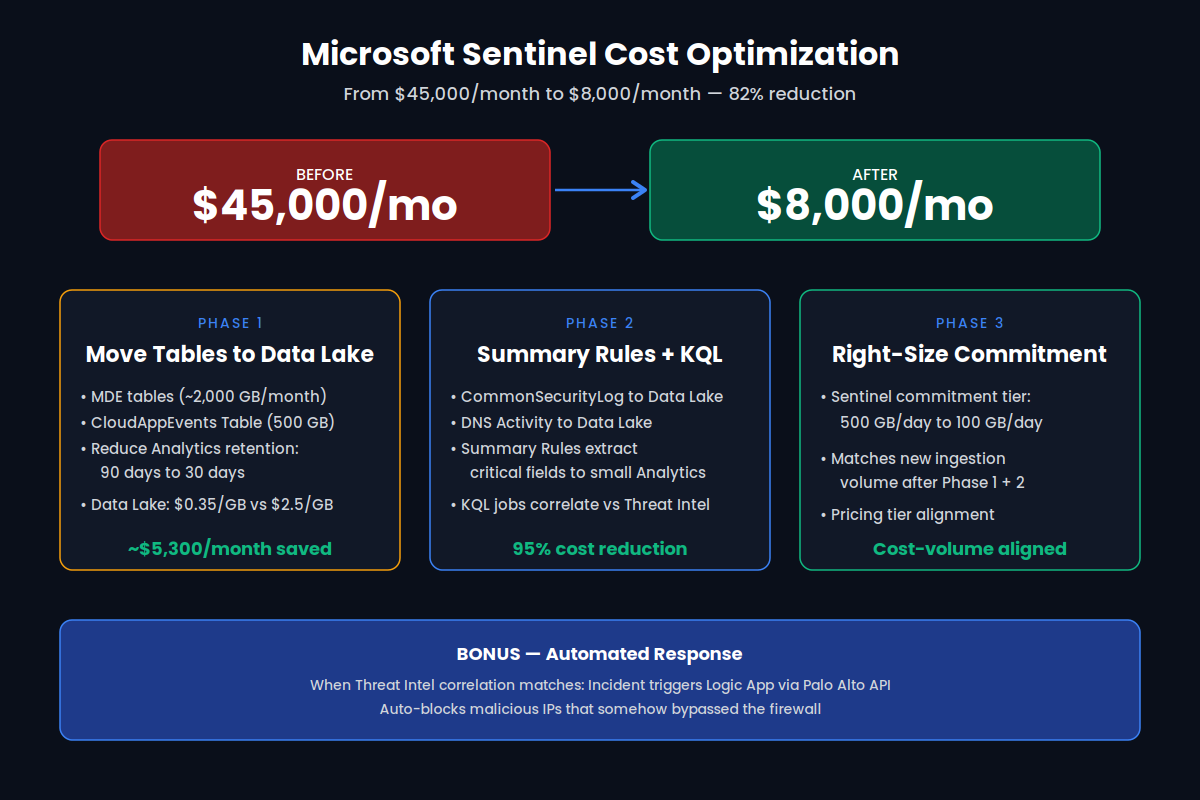
A customer came to us with a Microsoft Sentinel bill that had quietly climbed to $45,000 per month. Their SOC was happy with detection coverage, but finance was not — and the next renewal conversation was going to be painful. After a six-week engagement we brought their monthly Sentinel spend down to roughly $8,000 per month — an 82% reduction — without removing a single analytics rule or losing visibility into a single attack surface.
This post walks through exactly how we did it: the architecture decisions, the table-by-table cost math, and the three phases we rolled out in production. If you operate Microsoft Sentinel at any serious volume, the same patterns will apply.
The architecture in one picture
Before diving into phases, here is the full picture: which tables moved to the Data Lake tier, which stayed in Analytics, which were replaced by Summary Rules, and how the commitment tier was right-sized. The dollar figures next to each table are the actual monthly savings we measured for this customer.
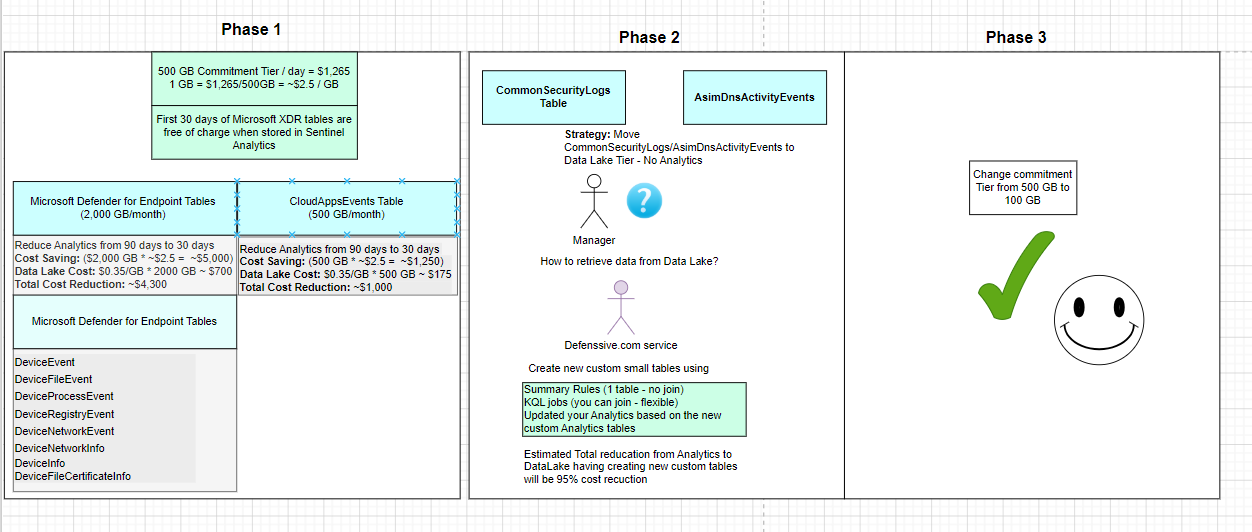
The core insight is simple but easy to miss: in Microsoft Sentinel, ingestion tier — not data volume — drives most of the cost. The Analytics tier (the default for everything) is roughly $2.50 per GB. The Data Lake tier is roughly $0.35 per GB. That is a ~7x difference for data that, in many cases, you only need for hunting, investigation, or long-term retention — not for real-time analytics rules.
Phase 1 — Move high-volume tables to the Data Lake
The first lever was the easiest and the largest: identify the highest-volume tables that were sitting in the Analytics tier purely out of habit, and move them to the Data Lake tier. Two table families dominated this customer's bill:
- Microsoft Defender for Endpoint tables (~2,000 GB/month):
DeviceEvents,DeviceFileEvents,DeviceProcessEvents,DeviceRegistryEvents,DeviceNetworkEvents,DeviceNetworkInfo,DeviceInfo,DeviceFileCertificateInfo. These are free for the first 30 days when stored in Sentinel Analytics — but the customer had retention set to 90 days, paying full Analytics rates for the extra 60. - CloudAppEvents (~500 GB/month): heavy SaaS telemetry that the SOC rarely queried in real time, but wanted available for investigation up to one year out.
The fix was a two-part change. First, drop Analytics retention from 90 days to 30 days on those tables — eliminating the paid 60-day tail. Second, route a parallel copy into the Data Lake tier with a one-year retention policy. The math at $0.35/GB for the Data Lake versus $2.50/GB for Analytics is what makes this work.
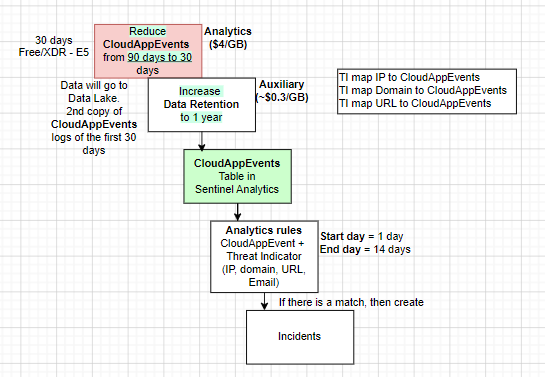
For the analytics rules that previously ran across the full 90-day window, we narrowed the active detection window to start day 1, end day 14 — the realistic window in which a CloudAppEvent + Threat Intel correlation produces an actionable incident. Older data still exists in the Data Lake for retroactive hunting; it just isn't billed at Analytics rates while it sits there.
Phase 1 result: roughly $5,300/month saved across MDE + CloudAppEvents, with zero detection regression.
Phase 2 — Summary Rules and KQL jobs replace raw ingestion
Phase 2 went after the next two beasts: CommonSecurityLog (Palo Alto firewall logs) and AsimDnsActivityEvents. These are billions of records per month — and the SOC was paying Analytics rates to store them even though detection only needed a small fraction of the fields.
The pattern we deployed:
- Move
CommonSecurityLogandAsimDnsActivityEventsto the Data Lake tier — no Analytics ingestion at all. - Build Summary Rules in Sentinel that extract just the fields we need for detection (source IP, destination IP, domain, URL, action) and write them to a small, purpose-built Analytics table.
- Schedule KQL jobs against the Data Lake to correlate raw logs with Threat Intel feeds (IP, domain, URL, email) on an hourly or two-hourly cadence — joining across tables in ways Summary Rules can't.
- Point existing analytics rules at the new compact tables. Matches generate incidents exactly as before.
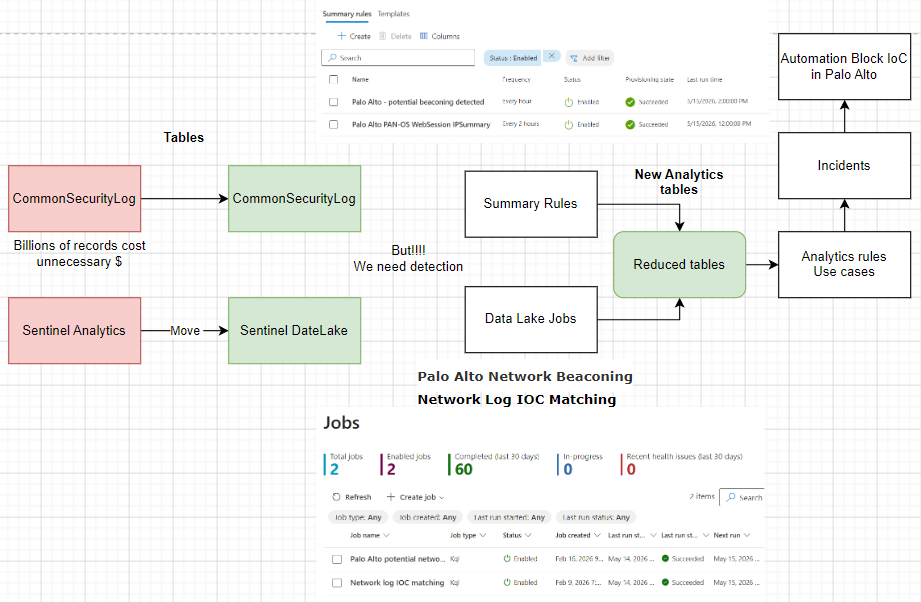
In production we ran two jobs continuously: "Palo Alto potential beaconing" (hourly) and "Network log IOC matching" (every two hours). Both have run reliably across 60+ executions in the last 30 days with zero health incidents. The Analytics tables they populate are small enough that their cost is rounding error.
Phase 2 result: roughly 95% cost reduction on the firewall and DNS pipelines, while keeping full raw data available in the Data Lake for forensic queries.
Phase 3 — Right-size the commitment tier
Sentinel's commitment tiers are a discount you only realize if you actually hit the daily volume you committed to. After Phase 1 and 2, this customer's daily ingestion had dropped from well above 500 GB/day to comfortably below 100 GB/day. They were now overpaying for unused capacity.
We dropped the commitment tier from 500 GB/day to 100 GB/day. This single change — a settings update, no engineering work — aligned the pricing tier with the new ingestion volume from Phases 1 and 2. The commitment dollars now go into the data that genuinely benefits from the Analytics tier.
Bonus — Automated response
The KQL jobs in Phase 2 don't just create incidents. When a Threat Intel correlation hits — for example, an internal host reaching a known-malicious IP that somehow bypassed the perimeter — the incident triggers a Logic App that calls the Palo Alto API and auto-blocks the offending IP. Time-to-containment for that class of incident dropped from analyst-hours to machine-seconds.
The takeaway
Most Sentinel cost problems we see are not "you're collecting too much data." They're "you're collecting the right data into the wrong tier, with the wrong retention, on the wrong commitment plan." Three architectural moves — tier separation, Summary Rules + KQL jobs, and right-sized commitment — reliably take 60–80% off a mature Sentinel bill, with no loss of detection coverage and a faster automated response on top.
If your Sentinel bill looks like the "before" picture, we'd be happy to do the same exercise for you.